















When the buyer’s phone has internet
You can send a lock or unlock from the shop app. The phone does it and tells your app. A phone with no internet gets the command only when it connects again.
Private pilot with selected shops in Pakistan
PayGuard is an EMI lock app for mobile shops in Pakistan that sell Android phones on installments (qist). The buyer gets reminders before each due date. After the grace days you set, an unpaid phone locks by itself, even offline.
Looking for the app? There is no app to download yet. Register your shop first. We set up PayGuard with selected shops.
A reminder before every due date and a lock after the grace days. Now your buyer has a very strong reason to pay on time.

The phone itself becomes your security, so a guarantor is not really needed. Many buyers cannot bring a guarantor, often out of embarrassment. Now you can sell to buyers you used to turn away.
Every screen, help page and message, for you and your buyer. In Urdu or English.
Why PayGuard
In the installment business, cash flow is everything. The money a buyer pays this month is the money you sell the next phone with. Late installments stop that circle. PayGuard keeps it moving.
Money that moves is money that earns.
No more calling again and again. No more messages that get no reply. No more taking the bike out to the buyer’s house. Save time, fuel and painkillers.
Money owed is not business. It is only hope.
The hours you spent chasing go back into your shop: serving customers, talking to suppliers, making the next sale.
You see who paid, who is late and which phone is locked, in one app. Nothing to remember, nothing lost in a notebook.
Run your installment business. Stop running after it.
Register your shopA stuck installment is a stuck business.
In the notebook, you call and wait. In the shop app, the buyer gets reminders, and a phone still unpaid after grace locks.
Example. Before: a messy handwritten notebook. Sara Khan paid Rs 4,000. Usman Malik, Rs 2,400 crossed out and changed to Rs 2,000, today. Imran Ali, Rs 3,500, not picking up. Asif Raza, Rs 3,000, number off, row crossed out. Bilal Khan, Rs 4,000, due 15 Sep, late, called 3 times. Total 9,400 crossed out, 9,000 with a question mark. The shop calls Bilal again: no answer. After, in the shop app: Sara paid, Usman paid today, Imran got a reminder, Asif and Bilal are locked, and Bilal calls the shop.
Drag the circle to compare.
Four steps. You set the plan once. PayGuard does the reminding.

You record the sale and the plan in the shop app. The buyer’s phone shows the next amount and the due date.


Three days before the due date, the buyer sees the amount, the date and your shop’s numbers. You do nothing.
Grace over. The phone locks by itself.


The buyer pays Rs 4,000 cash. The shop records it and reads out a one-time code. The phone opens.
What the buyer sees, and what your shop records.
Phone
You can send a lock or unlock from the shop app. The phone does it and tells your app. A phone with no internet gets the command only when it connects again.
The due date and grace time are saved on the phone. If the payment is still late after grace, the phone locks on its own. After payment, a one-time code from your shop can unlock it without internet, where enabled.

The more times your money turns, the more times it earns.
We add only a few shops each week. Register today so your shop is on the list.
Fully in Urdu
In an installment sale, the shop and the buyer must understand exactly the same thing. So PayGuard is fully in Urdu: every screen, every help page, every message, even the error messages.
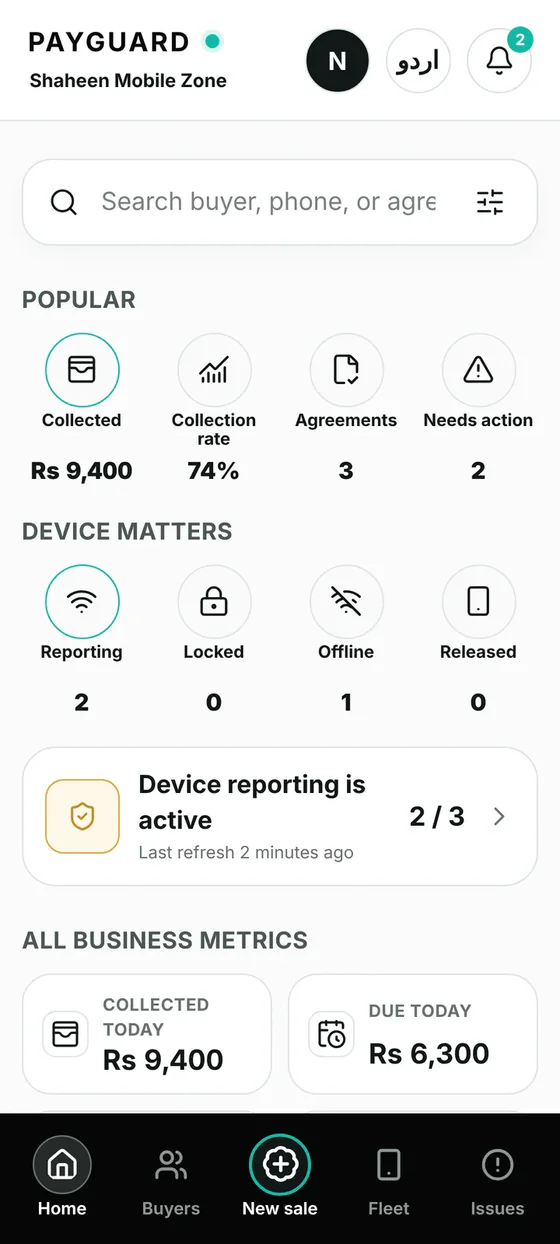
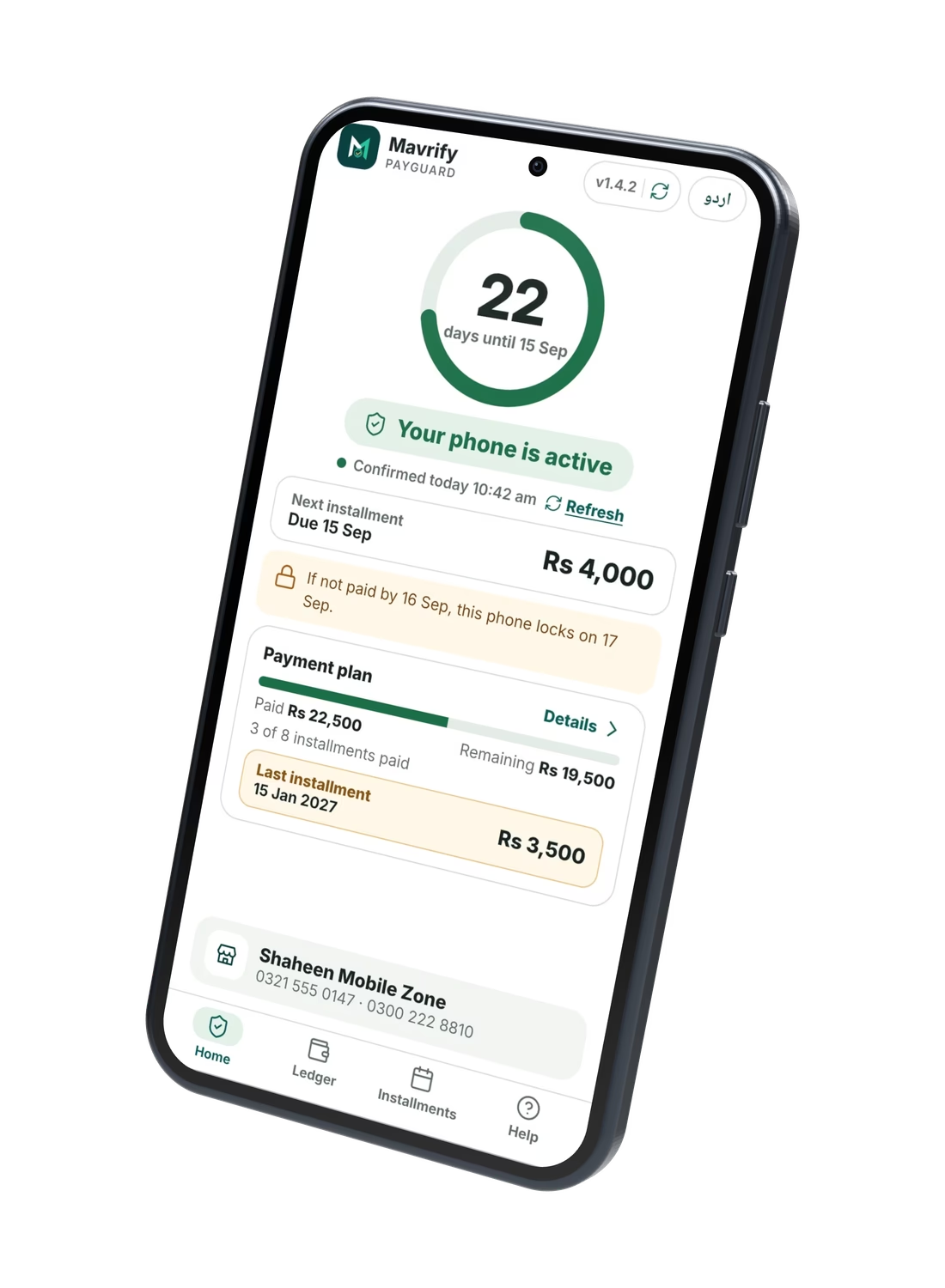
Real app screens with example names and amounts.
A buyer who understands the agreement is more likely to keep it. PayGuard is made to be clear with the buyer. It is not made to spy on them.
PayGuard handles the installment agreement and the lock only. It has no access to the buyer’s photos or messages.

On the locked screen only two things work: emergency calls and a call to your shop.

Is the buyer’s bank or JazzCash app on the locked phone? He can open the phone himself for 4 hours to pay. Once for each installment.
A new lock never starts at night. The buyer can pay the same day and get the phone back the same day.

The next amount, the due date, the lock date if unpaid, your shop’s numbers and where to pay (your payment details, if you turn them on). Before a lock and after it.

After the last payment, PayGuard removes its control for good, automatically.

PayGuard works on Android 11 and newer phones from major brands.
iPhone is not supported.
There is no public download yet. PayGuard is in a private pilot. Register your shop on this page. If your shop is selected, our team contacts you and sets up PayGuard with you.
An EMI lock app (also called an EMI locker, a qist lock app or a mobile finance lock app) locks a phone sold on installments when a payment is late. Here EMI means an installment, or qist. PayGuard is this kind of app for mobile shops: reminders first, a lock only after the grace days, and release after the last installment.
PayGuard is a phone lock app for mobile shops that sell phones on installments. It saves the sale and the payments and reminds the buyer. On supported phones, it locks the phone if a payment is still unpaid after the agreed grace days. There is a shop app for you and a small app on the buyer's phone.
Mobile shop owners who sell Android phones on installments (EMI) and want fewer late payments and less chasing. We are starting with selected shops across Pakistan.
The sale is protected, so you can say yes to buyers you used to refuse, with or without a guarantor. PayGuard does not decide for you. Your shop still chooses who qualifies.
No. PayGuard helps you protect the sale and reduces chasing, but no app can guarantee repayment. Your shop still decides who to sell to.
Yes, when the buyer's phone has internet. Send the lock or unlock from the shop app. The app shows you when the phone has done it. A phone with no internet gets the command when it connects.
On supported setups, the due date and grace days are saved on the phone itself. If the installment is unpaid after the grace days, the phone locks on its own, without internet. Remote commands wait until the phone connects.
Where offline codes are enabled, the shop app gives you a one-time code after you record the payment. The buyer types it on the locked screen. The phone unlocks without internet. Each code works only once. It is not a master code.
From the locked screen, the buyer can open the phone himself for 4 hours. Then he can pay on the same phone, for example with JazzCash or his bank app. He can do this once for each installment.
The buyer sees the late amount and the lock date on the phone. If it is still unpaid when the grace days end, a supported phone locks. The locked screen says why, shows your shop's numbers and your payment details (if you turn them on), and has an emergency-call button. Record the payment: the phone unlocks by itself if it has internet, or with a one-time code if it has none.
Yes. Your shop decides the grace days. If a buyer really cannot pay on the due date, you can give him extra grace days. The phone locks only after the grace days end.
On a phone set up correctly, the buyer cannot reset it from Settings (factory reset). The buyer cannot remove the PayGuard app (uninstall it). USB debugging is turned off. The lock has many security layers, so getting around it (bypass) is not easy, and not cheap. To be honest, no app in the world can promise it can never be bypassed. Your sale and the amount owed always stay saved on our server.
After you record the last installment, PayGuard permanently removes its installment control from that phone. The buyer's phone confirms the release and your shop can no longer lock it.
Contact the shop that sold you the phone. Its numbers are on the locked screen. When the shop records your payment, the phone opens. The locked screen has an emergency-call button.
No. A guarantor is optional. Your shop decides, sale by sale, whether to ask for one.
The buyer's name, mobile number and CNIC picture, the phone, the sale amount, the down payment, the installment plan with due dates, and every payment. When your shop asks for a guarantor, you can record the guarantor's details and CNIC picture with the agreement. What is collected is explained before onboarding. Your shop and the buyer can both see this payment record.
Your shop can show its bank account or JazzCash details to the buyer, only if you turn this on in your shop profile. Then the buyer always knows where to pay.
Yes. The buyer gets several reminders on the phone before the due date, with the amount, the date and your shop's contact.
Yes. Calls, WhatsApp, camera, apps — everything works as normal. The PayGuard app stays on the phone, but it does not disturb the buyer while he pays on time. When he wants, he can open it to see the next due date and your shop's contact.
PayGuard is for installment control. It has no access to the buyer’s photos or messages. Before setup, we explain to shops and buyers what buyer information is saved and what your shop can see and do. Buyers see the agreement and your contact on the phone.
Android 11 and newer phones from major brands. PayGuard does not support iPhone.
No. iPhone is not supported.
No. PayGuard uses the device-management controls that are built into Android. No root, no custom firmware, no hardware changes. It installs on standard Android phones.
PayGuard is not a normal app that the buyer downloads. Each phone gets a special secure setup and is linked to its own installment plan. Our team sets up your first phones with you and shows you every step. The first setup of each phone needs internet.
The shop app keeps working. Payments you record are saved on your phone, and they sync to the server when the internet comes back.
If you can use WhatsApp, you can use PayGuard. The shop app uses plain words and big buttons, with help and guide graphics at every step. Our team also shows you the steps during onboarding. The app and our support are in Urdu and English.
A real person helps participating shops set up the first phones and answers questions by call, WhatsApp or email. Contact details are shared with participating shops.
Not yet. PayGuard is built. Selected shops are testing it in a private pilot. New shops can register for a future batch. We add a limited number of shops each week, so that each shop gets full setup and support. Pilot shops also get extra time to test PayGuard.
Fill in the short form below. Only your name and WhatsApp number are required. We contact selected shops before onboarding. Registering does not guarantee a place or a date.
There is no monthly or yearly fee, no setup fee and no support fee. You pay one small fee for each phone you sell on installment. That fee covers the phone for its whole installment period. There is no minimum number of phones. Our team tells you the exact fee when we contact your shop. Pilot shops get a special discount.
No match. Ask us: hello@mavrify.com
Ready to grow your business?
No more taking the bike out every other day to chase a payment. Run your shop the modern way.
PayGuard is in a private pilot, so the app cannot be downloaded directly yet. To register, your name and WhatsApp number are enough. We select shops after registration, so we cannot promise a place or a date yet.
We will contact you on WhatsApp before your batch opens.
Your registration number:
Keep this number. If you have a question about your registration, email us and include it: hello@mavrify.com
We reply from partners@mavrify.com.
Your reference number:
Do you finance phones, build lending software, distribute phones or make them? Let’s work together. Tell us in a few lines what you do, and we will get back to you.
Send us a messagepartners@mavrify.com